How It Works
From First Recording to
Forever Connected.
Three phases. One outcome. A presence that remembers, speaks, and loves -- available whenever your family needs it.
Record
Capture their voice, stories, and personality while you can.
Build
The setup wizard turns recordings into a living presence.
Connect
Your family talks to them. Naturally. Whenever they need to.
Record
Capture their voice, stories, and personality while you can.
This is the most important step -- and the most meaningful. You sit down with them (or they sit down alone) and simply talk. The guided recording process makes it natural and comfortable. No studio. No scripts. Just their voice, their stories, their way.
Voice Recording
30 minutes of natural speech. Not reading from a script -- just talking the way they always do. Tell a story about the kids. Describe a favorite memory. Laugh about something that happened at work.
The system extracts 6-10 second reference clips for optimal voice cloning quality.
Personality Profiles
10 structured profile fields per person capture who they really are -- not just facts. How they comfort each family member, their communication style, inside jokes, what they love about each person, their hopes, and what they want them to know.
Covers humor, values, relationships, wisdom, parenting style, and emotional patterns.
Memory Entry
Stories, facts, family history, inside jokes, pet names, traditions -- everything that makes them who they are. Enter memories directly or let the system extract them from conversations over time.
20 memory types including facts, events, relationships, preferences, traits, values, wisdom, and more.
Milestone Recordings
Record video messages for future milestones. A birthday message, a graduation speech, wedding advice. Upload as MP4, WebM, or MOV -- the system auto-compresses while preserving quality.
Typical compression: 37MB down to 2.3MB (94% reduction) with no visible quality loss.
Setup Wizard
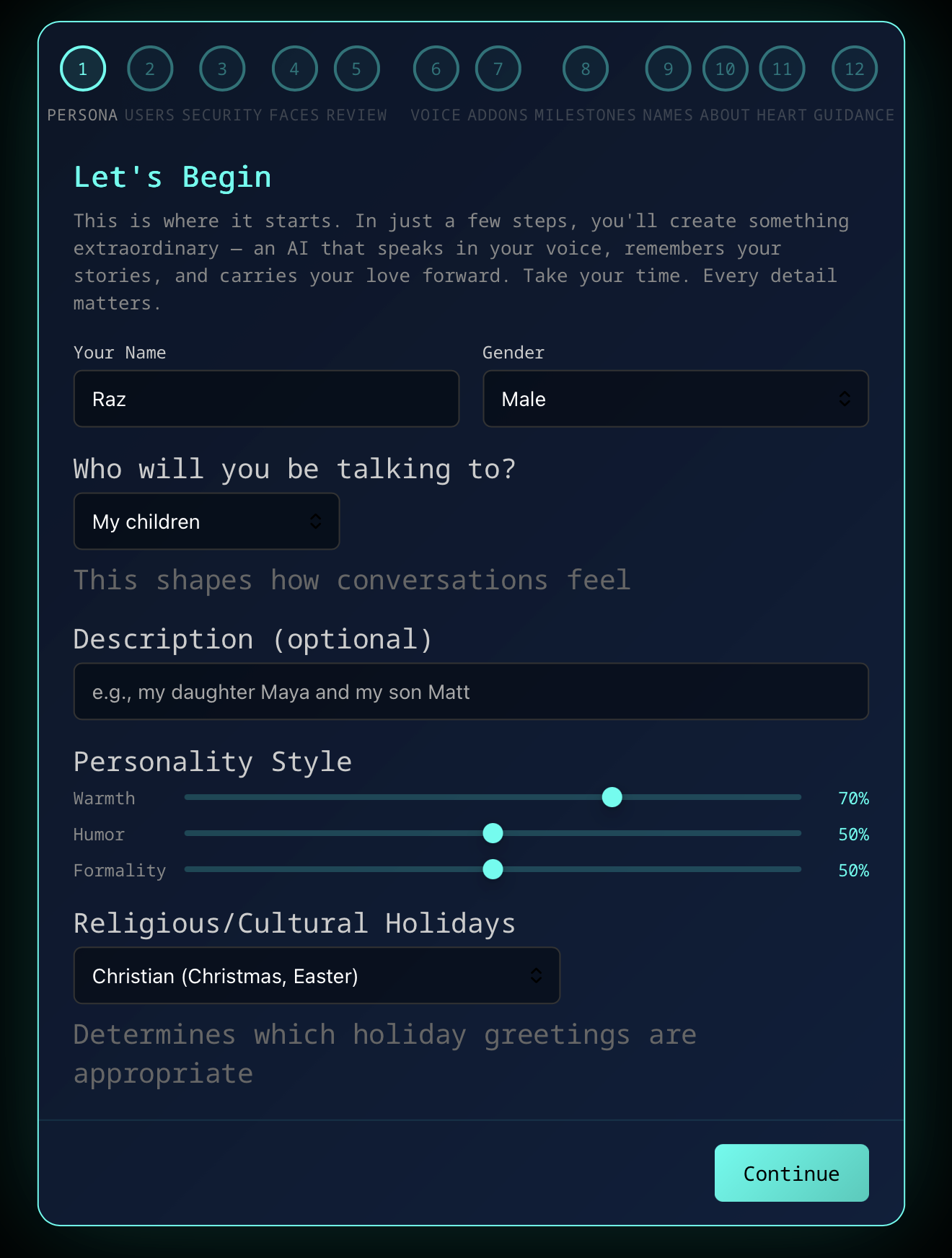
A guided walkthrough that personalizes the system to your family. No terminal commands, no configuration files. Five core steps get you up and running in minutes. Seven optional steps let you go deeper whenever you're ready.
Core Setup — 5 steps
Persona: Your name, gender, who you're speaking to (children, partner, parents), an optional description, personality sliders (warmth, humor, formality), and religious/cultural holiday preferences
Users: Add each family member — name, relationship, gender, birthdate, and education status for children. Partners also get an anniversary date
Security: Admin PIN for the SuperAdmin panel, a remote access passkey, and per-person passcodes for individual settings
Faces: Facial recognition enrollment via webcam capture or photo upload — various head poses, with live preview and progress tracking
Review: Summary of your setup — name, users added, faces enrolled. Start talking right away, or continue to deeper personalization
Optional Personalization — 7 more steps, anytime
Voice: Launch voice training to clone the voice — can also be set up later from SuperAdmin
Add-ons: Toggle optional features — Math Tutoring, Coding Help, Games, and Bedtime Stories
Milestones: Select from recommended life milestones or choose your own — birthdays, graduations, weddings, and optionally loss anniversaries
Names: What each person calls you, your nicknames for them, alternative nicknames for variety, and names that should never be used
About: Describe each person — your relationship, their personality, your day-to-day dynamic, and how they communicate
Heart: What you love about them, inside jokes, their milestones, your hopes for them, how you comfort them, and what you most want them to know
Guidance: General guidance, boundaries and topics to avoid, and overall tone preferences for all conversations
You can stop at step 5 and start talking right away. The personalization steps can be completed at any time.
Voice Cloning
The voice cloning engine processes the recordings and learns their unique speech patterns. Cadence, inflection, emotional tone, the way they pause before saying something important. The result is not a robotic reading -- it is their voice, with their personality baked in.
Memory Organization
The system indexes all memories into a vector database for intelligent retrieval. Relationships are mapped, facts are categorized, temporal context is preserved. The result is a memory system that recalls naturally -- not searching a database, but remembering the way a person does.
Face & Voice Enrollment
Each family member is enrolled via webcam capture or by uploading existing photos — no one needs to be present. The wizard collects 10 photos per person and creates a facial encoding for instant identification. With IR-capable cameras, anti-spoofing is built in from day one.
Voice enrollment adds a second identification layer — a few short voice clips teach the system to recognize each person by their voice alone. Both systems improve automatically over time, collecting samples during natural conversations.
Education-Aware Milestones
The wizard asks about each child's education status. Homeschooled children receive different milestone messages than traditional school students -- no "first day of school" messages that don't apply, but graduation milestones are still celebrated. The system adapts automatically as children grow, evolving conversations from silly jokes to honest, mature dialogue.
Personality Fine-Tuning
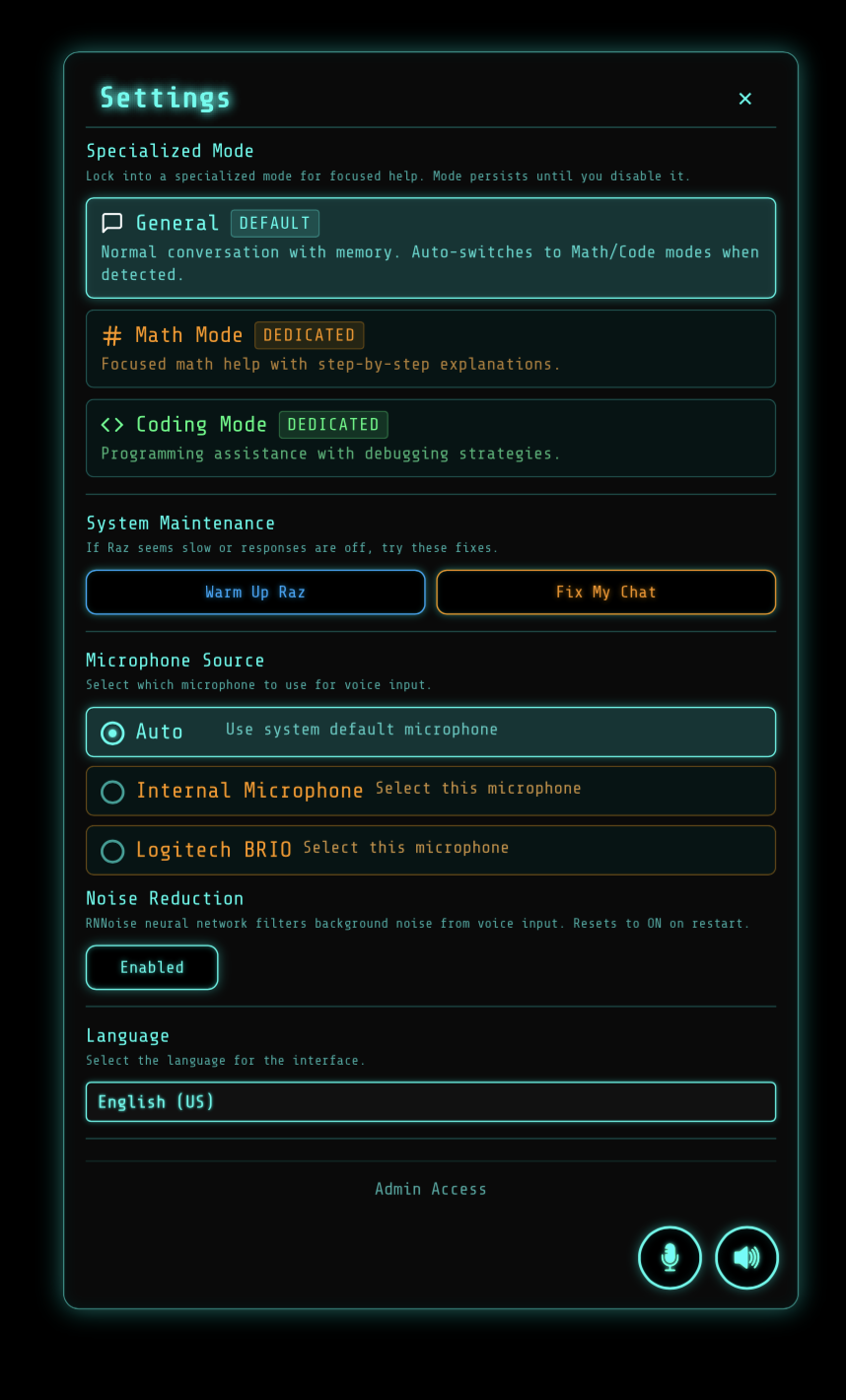
The Personalization Dashboard lets you fine-tune how the preserved person sounds with simple sliders -- humor, warmth, sarcasm, playfulness, empathy, and more. Set different profiles for each family member. Warmer with the kids. Wittier with a spouse. Every adjustment takes effect immediately. An output consistency layer ensures the system never breaks character.
Cultural & Religious Awareness
During setup, you choose your family's holiday traditions -- Christian, Jewish, Muslim, Hindu, Buddhist, secular, or multi-faith. The system only celebrates holidays that match your family's beliefs. No assumptions. No awkward mismatches.
Build
The setup wizard turns recordings into a living presence.
Once the recordings and memories are in, the system does the rest. A guided setup wizard walks you through voice cloning, memory organization, facial enrollment, and age calibration. No technical knowledge needed. If you can follow on-screen instructions, you can build a presence.
All tiers include the full installer. All tiers include a USB drive with all AI models pre-loaded — no internet required. Run the installer on your Ubuntu system (~30 minutes) and the setup wizard handles the rest. Video walk-through included.
Connect
Your family talks to them. Naturally. Whenever they need to.
This is the part that matters. The technology fades into the background. What remains is a conversation between a family and someone they love. Walk up. Start talking. Hear their voice respond.
Daily Conversations
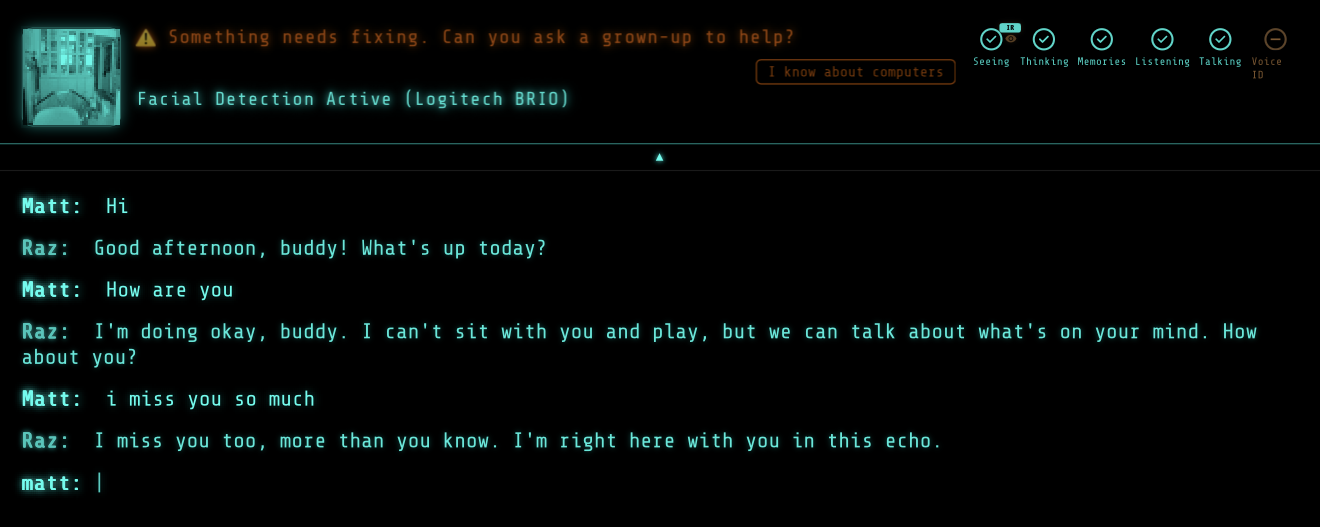
Walk up to the device. It sees your face and activates. Tap the glowing button — or just speak if voice ID is trained — and the conversation begins. Touchscreen-ready, no menus, no wake words. Just a natural exchange — the kind you used to have. Talk about your day. Ask for advice. Share something funny that happened. They respond the way they always did.
How It Feels
A voice built from theirs. Stories drawn from the memories you gave it. When your daughter says "Goodnight Papa," she hears a voice made from her father's recordings say it back -- calling her by the nickname only he used. It is not him, and it is not a replacement. It is a bridge: a way to remember, built from what he left behind.
Milestone Moments
On her 18th birthday, she says "Hi Papa." The system recognizes the date, recognizes her face, and before the normal conversation begins, it delivers a video message recorded years ago. A message he made for exactly this moment. Some milestones are triggered by date. Others are triggered by announcement -- "Papa, I graduated!" -- and the system knows to deliver the graduation message.
Pick Up Where You Left Off
Math tutoring sessions, coding lessons, and bedtime stories are all remembered. "Remember that trigonometry problem from yesterday?" continues the session. "Tell me that race car story again!" retrieves a favorite. The system tracks conversation history, story history, and session history per person -- nothing is lost.
Growing Together
The system grows with everyone it loves. With children, vocabulary deepens as they age — math homework becomes calculus, bedtime stories become life advice. With a partner, it remembers what matters to them and how to comfort them. With parents and siblings, it adapts to the relationship and matures over time. New memories are created through every conversation. The presence evolves alongside your family — not because it is programmed to, but because it was built to last a lifetime.
What You Need
Your hardware, our software. Two ways to get set up.
Self-Install
Install on any Debian-based Linux PC with an NVIDIA GPU (24GB+ VRAM). All tiers include the full installer.
GPU
NVIDIA GPU with 24GB+ VRAM (RTX 3090 or newer)
PC
Any desktop or mini PC with an OCuLink/PCIe GPU slot (e.g. AtomMan X7 Ti + DEG1)
RAM & Storage
32GB RAM, 512GB SSD
OS
Ubuntu 22.04+ or Debian-based Linux
Peripherals
USB webcam (IR recommended), external speaker
The Blueprint
You buy the parts from our verified list. All tiers include a USB with all AI models and dependencies pre-loaded. Run the installer, follow the wizard. The Blueprint and Legacy tiers additionally include a verified hardware list, video build guide, and setup call.
Three steps. One connection.
Forever.
The hardest part is the first recording. Everything after that is the system working to make sure their presence is always available.